Electrician Job Estimator

Estimates and quotations for electricians · Android

Price the job. Plan the stages. Send the quote.

Electrician Job Estimator is a pocket estimating tool for independent electricians and small electrical firms. Build the price of a job from work items and your own material prices, add travel, markup and VAT in the right order, and share a tidy quotation as a PDF.

Coming soon to Google Play See how the price is built

The app is not on Google Play yet. This button will take you there once it is.

  • No account
  • No adverts
  • No internet permission
  • Works offline
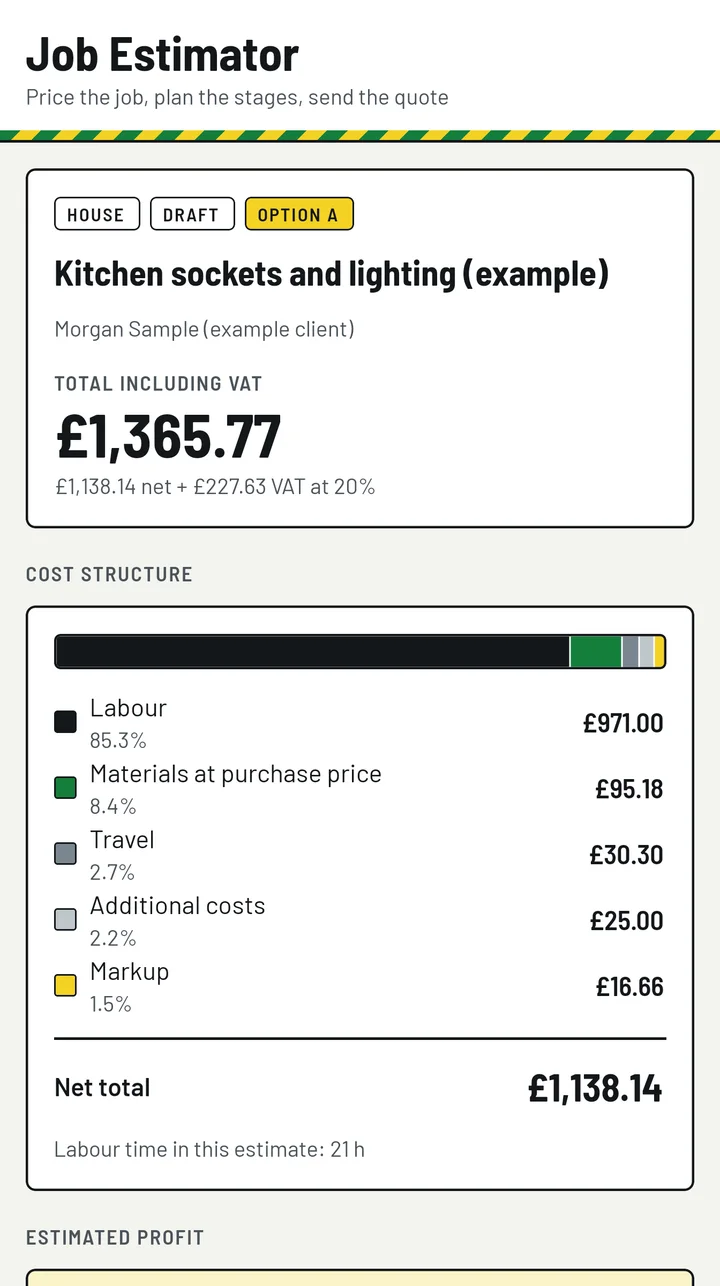
Home screen of the app showing the example job: total including VAT £1,365.77, a cost-structure bar and its legend.

What one job is made of

Example data · invented prices

Kitchen sockets and lighting (example) Morgan Sample (example client)

Labour
£971.00 85.3%
Materials at purchase price
£95.18 8.4%
Travel
£30.30 2.7%
Additional costs
£25.00 2.2%
Markup
£16.66 1.5%
Net total
£1,138.14
VAT at 20%
£227.63
Total including VAT
£1,365.77

These are the figures of the example job that comes with the app. The job, the client and every price in it are invented; your own jobs use your own figures.

Price the job

Works and materials line by line, then travel, markup and VAT, always in the same order.

Works from a catalogue, materials at the prices you pay

Create a job for a flat, a house, an office or a small commercial unit. Add works from the built-in catalogue: sockets, switches, light fittings, cable runs, consumer units, data points and more. Every line has a quantity, an expected time and a price.

Materials come from your own price list, with the prices you pay, units and categories. The materials cost and the total labour time are added up for you.

The catalogue is not a price guide. Its times and prices are invented examples, marked “example” until you change them, and the app ships with no material prices of its own. Replace them with your figures once and they are yours from then on.

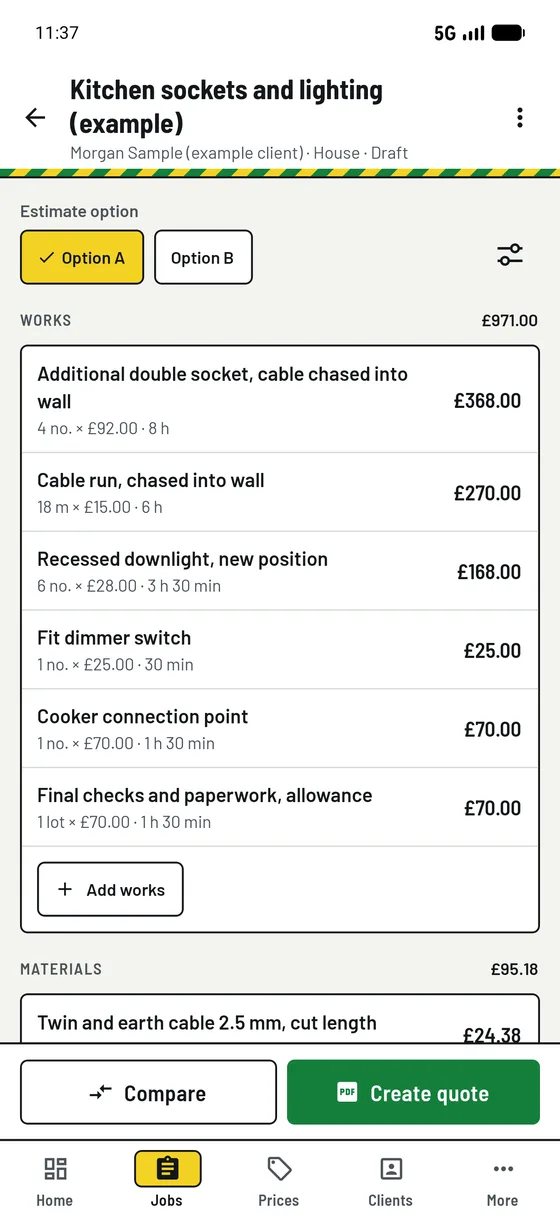
Job screen for the example job: option chips, a list of works with quantities, times and prices totalling £971.00, and the start of the materials list.
The job screen is your working sheet. Example data.

The order of the sums

Every amount is held in whole pence, so the sums are exact. This is the order, the same on every screen and in the PDF. The right-hand column is the example job.

  1. Work lines Quantity × labour price for one unit. Each line is rounded to the nearest penny; a half penny rounds up. Labour £971.00
  2. Material lines Quantity × purchase price for one unit, rounded to the nearest penny per line. Materials at purchase price £95.18
  3. Travel Round-trip miles × visits × pence per mile, rounded once, plus parking and tolls as entered. Travel £30.30
  4. Additional costs Anything else the job costs you, such as waste disposal or hire. Added as entered. Additional costs £25.00
  5. Markup Your percentage of the materials cost, which is the default, or of all four costs above if you choose “All costs”. Rounded once to the penny. 17.5% of £95.18 £16.66
  6. Net total Steps 1 to 5 added together. Net total £1,138.14
  7. VAT Your chosen rate applied to the net total and rounded once to the nearest penny. Left out entirely when the quote is prepared as not VAT registered. VAT at 20% £227.63
  8. Total Net total plus VAT. Total including VAT £1,365.77
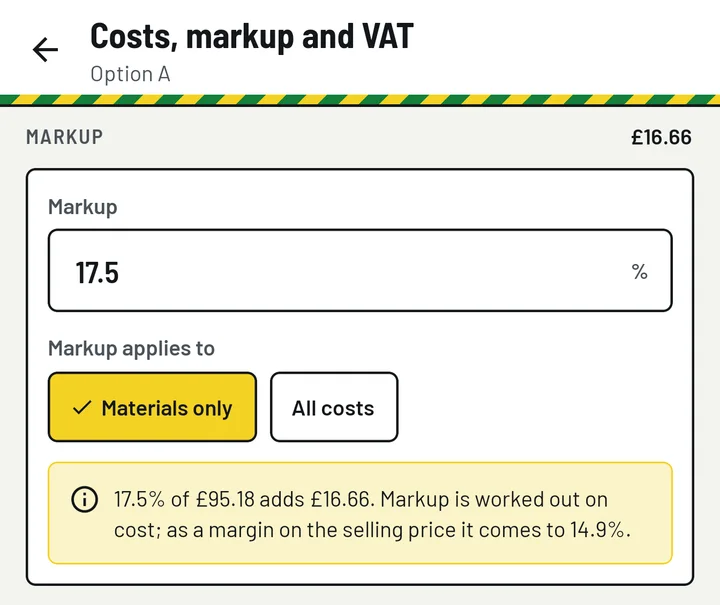
Markup card in the app: 17.5%, applied to materials only, with the note that 17.5% of £95.18 adds £16.66 and comes to a margin of 14.9%.

Markup is not margin

Markup is a percentage added to cost. Margin is the share of the selling price that the markup makes up. The app always asks for a markup, on materials only or on all costs, and shows the margin it gives you separately: in the example, 17.5% of £95.18 adds £16.66, which is a margin of 14.9%.

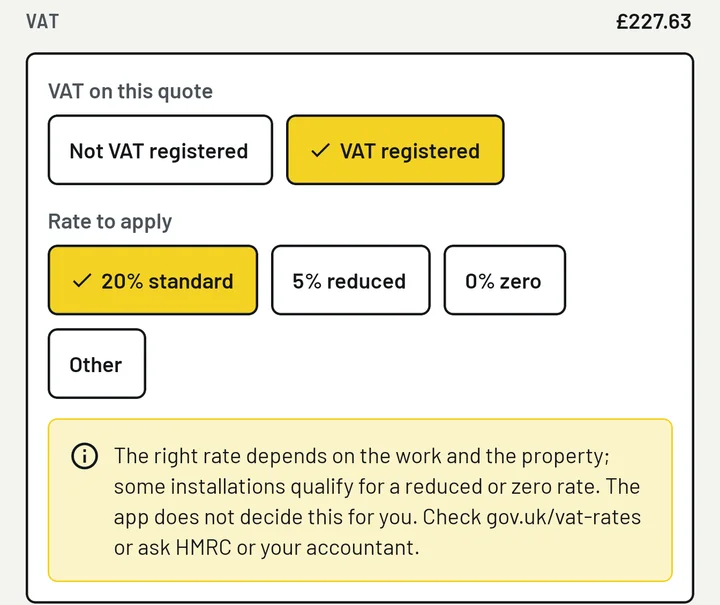
VAT card in the app: Not VAT registered or VAT registered, then 20% standard, 5% reduced, 0% zero or Other, and a note that the app does not decide the rate.

VAT is your setting, quote by quote

Prepare a quote as “Not VAT registered”, or as VAT registered at 20%, 5%, 0% or a rate you type in. The right rate depends on the work and the property, and the app does not decide it for you: check with HMRC or your accountant. On a quote that is not VAT registered, no VAT line and no VAT number are printed.

Plan the stages

Offer the client a choice, and show how long each part of the work should take.

Two options, side by side

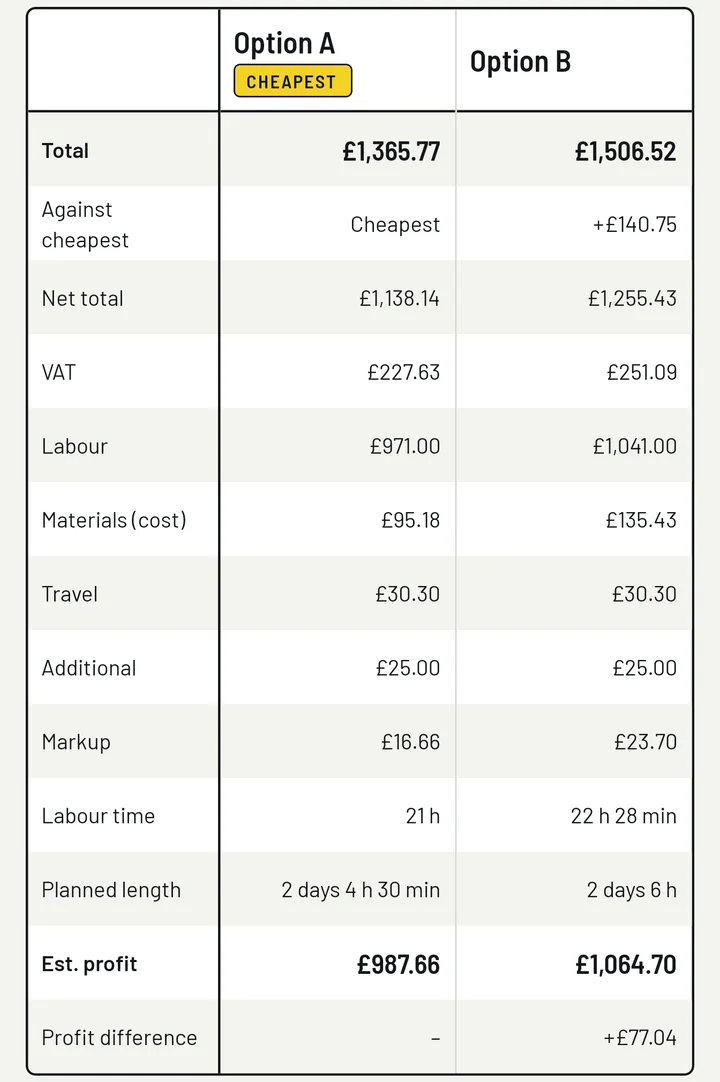
Keep several options for the same client, for example a basic and a fuller specification. Copy an option, change what differs and compare them in one table: total, net, VAT, labour, materials, travel, markup, labour time, planned length and estimated profit.

Option B in the example £1,506.52 +£140.75 against the cheapest

Compare options table for the example job: Option A £1,365.77, marked cheapest, and Option B £1,506.52, which is £140.75 more.

Stages with a duration

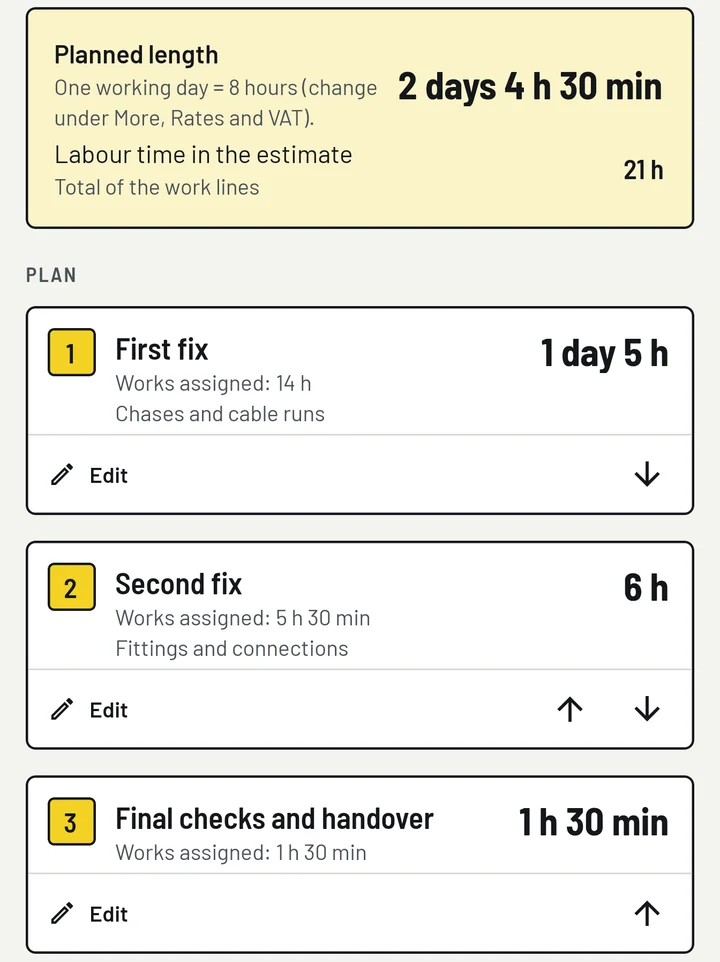
Split the job into stages such as first fix and second fix, give each an expected duration and assign the works to them. The app adds up the planned length and tells you how much work time is not assigned yet. The plan can be printed on the quote.

Planned length in the example 2 days 4 h 30 min one working day = 8 hours

Stages screen for the example job: planned length 2 days 4 h 30 min, labour time 21 h, and three numbered stages: First fix, Second fix, Final checks and handover.

Stage durations are your own estimates of working time. They are for planning and for the client’s information only.

Send the quote

A clean A4 PDF for the client. Your purchase prices, markup and profit stay with you.

Printed on the quotation

  • Your business details, and your VAT number only on a VAT-registered quote
  • The client’s name, address, phone number and email as you saved them, and the site address
  • Quote number, date and the date it is valid until
  • Works and materials with quantities and the price to the client, or a three-line summary: labour, materials, travel and other costs
  • Subtotal, a VAT line when the quote is VAT registered, and the total
  • The planned stages and their expected durations, if you tick the box
  • Your own payment terms, exclusions and other terms
  • A closing line saying the document is a quotation, not an invoice

Never printed

  • The prices you pay for materials
  • Your markup, as a percentage or as an amount
  • Your estimated profit
  • Your private notes on the job and the client

Where a markup applies it is included in the prices shown, spread over the lines in whole pence, so the printed lines add up to the printed total. This holds for the itemised quote and for the summary.

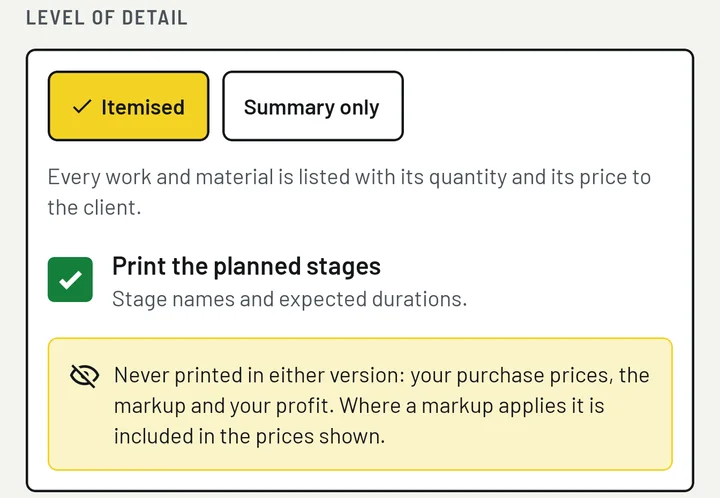
Create quote screen: level of detail Itemised or Summary only, a tick box to print the planned stages, and a note that purchase prices, markup and profit are never printed.

Choose an itemised quote or a short summary, then save and share the PDF through any app on your phone, or print it.

A quotation, not an invoice. The payment terms, exclusions and other terms are your own text. The wording the app starts with is a neutral example, not legal advice, and the document is not a contract template.

Also in the app

The parts you set up once and come back to on every job.

Jobs by type of property
A job is the estimate for one site: a flat, a house, an office or a small commercial unit, with its client, site address and notes for yourself.
A catalogue of works
Sockets, switches, light fittings, cable runs, consumer units, data points and more. Every line has a quantity, an expected time and a price, and you can add lines and items of your own.
Your own materials price list
The materials you buy, at the prices you pay, with units and categories. A line in an estimate keeps its own copy of the price, so changing the list later never alters a job you have already priced.
Clients and sites
Save the people and businesses you quote for, with their address, phone number, email and notes. Each client shows their jobs and the quotes prepared for them.
Quote history with numbering
Each quote is kept exactly as it was printed, with its status: prepared, sent, accepted or declined. Numbers run by prefix, year and sequence, and a number is never used twice.
CSV exports for yourself
Share the internal cost sheet of an option, headed “INTERNAL COST SHEET - NOT FOR THE CLIENT”, or your materials price list as a CSV file through the Android share sheet.

Your clients’ details stay on your phone

The names, addresses and phone numbers in the app are the ones you type in. They are stored on your phone and nowhere else; a file leaves it only when you share or print it yourself.

  • No account, no cloud

    There is no sign-up and no server. Jobs, clients, prices and quotes are stored only in the app on your phone.

  • No internet permission

    The app cannot open a network connection, so it cannot send your data anywhere.

  • No access to your contacts

    Client names, addresses and phone numbers are typed in by you. The app asks for no permission at all.

  • No adverts, no notifications

    No analytics, no in-app purchases and nothing running in the background either.

No backup in this version

The app has no backup and no import, and its data is left out of Android’s automatic backup. If you lose the phone, uninstall the app or clear its data, your jobs, clients, prices and quote history are gone. Keep the PDFs you send.

Read the privacy policy

What the app does not do

Worth knowing before you install it.

  1. It prepares price estimates and quotation documents from your own figures, and nothing else.
  2. It gives no wiring, design, cable-sizing, testing or certification guidance and does not check your work against any regulation. You remain responsible for how the work is designed, carried out and certified.
  3. It is not a price guide. The times and prices in the catalogue, and the sample materials you can load, are invented examples for you to replace, not market rates.
  4. It gives no tax or legal advice. You choose the VAT treatment and write your own terms. A quotation from the app is not an invoice and not a contract template.

Price the next job on your phone.

Coming soon to Google Play

The app is not on Google Play yet. This button will take you there once it is.

Questions, or a mistake in a sum? Write to [email protected].